
Document fraud detection for bank statements means testing a file on four independent layers: the PDF's internal structure and edit history, the arithmetic of every running balance, the consistency of fonts and layout with the issuing bank's real format, and agreement with sources the applicant did not produce. A genuine statement passes all four. An edited or recreated one usually fails at least one.
This guide is the hands-on companion to our overview of document fraud detection in underwriting. Where that article explains why altered documents are hard to catch by eye, this one walks through the checks themselves: what to open inside a PDF, how to reconcile a statement line by line, how scans differ from recreated files, how to cross-check against bank data, which findings are usually innocent, how to triage, and how to write a finding into the file so a second reviewer can follow it.
How do fraud detection tools tell a legitimate scanned bank statement from one that was digitally recreated or edited?
They classify how the file was born before judging what it says. A bank-generated PDF, a scan of a paper statement, an edited original and a recreated look-alike each leave a different structural fingerprint, and each one fails, or passes, different checks.
A scanned statement has no meaningful text layer, so font checks are useless on it; a bank-generated PDF has no scanner noise, so image checks are useless on it. The first job of any document tampering detection process is to work out which of four origins a file most likely has.
- Bank-generated digital original. Produced by the bank's statement system and downloaded by the account holder. It usually has a real text layer, a consistent set of embedded fonts, a single saved revision, and producer metadata that points to a server-side document composition tool rather than a desktop application. Its arithmetic reconciles by construction.
- Scan or photo of a paper statement. Each page is an image, sometimes with an OCR text layer added by the scanning app. Expect uniform noise, slight skew, consistent compression across the page and a producer that names a scanner, a phone app or a multifunction printer. Structural metadata says little about the content here, so arithmetic and cross-checks carry the weight.
- Edited original. A genuine bank PDF that someone opened in an editor and changed: a deposit amount, an NSF line, an ending balance. The tells are local. Most of the file still looks bank-generated, but one or two text runs use a different font object, sit a fraction of a point off the baseline, or live in an appended revision. Arithmetic often breaks at exactly the edited line.
- Digitally recreated statement. Built from scratch to look like a bank's format, sometimes from a template, sometimes now with generative tools. The structure is internally consistent but rarely matches the real bank's: different fonts, different producer, different object layout, slightly wrong spacing. A careful forger can make the arithmetic reconcile, so the strongest test is agreement with an outside source.
No single check catches everything. Arithmetic catches careless edits but not careful recreations. Structural analysis catches edits saved on top of a bank original but is nearly blind on a scan. Cross-source verification covers all four origins, because a forger controls the document but not the bank's records. A good fraudulent document detection process runs every layer and reads the results together.
What does a PDF's internal structure reveal about editing?
A PDF records more about its own history than its visible pages show: which software produced it, when it was created and modified, whether later changes were appended on top of the original, and which fonts each piece of text uses. None of these proves fraud alone, but together they show whether a file is plausibly what it claims to be.
PDF is an open standard. Version 1.7 was published as ISO 32000-1:2008 and PDF 2.0 as ISO 32000-2:2017, with a dated revision in 2020, according to the Library of Congress format description. Adobe hosts an openly accessible copy of the ISO 32000-1 (PDF 1.7) specification, which is the reference for every structure described below. You do not need to read the whole thing to review statements, but knowing four structures makes a reviewer far more effective.
The document information dictionary and XMP metadata
The document information dictionary holds optional entries including Creator, Producer, CreationDate and ModDate. In the specification's terms, Creator names the product that created the original document when it was converted to PDF, and Producer names the product that converted it to PDF. Since PDF 1.4, files can also carry XMP metadata, an RDF-based metadata packet that often repeats and extends the same facts. Read both: when an editor rewrites one but not the other, the disagreement is itself a signal.
What you are looking for is plausibility. A statement downloaded from a bank's portal normally names a server-side composition or reporting tool, and its creation date sits shortly after the statement period closes. A consumer desktop editor in the Producer field, a ModDate weeks after CreationDate, or a CreationDate that precedes the end of the statement period are all worth a closer look. So is a set of three monthly statements from the same bank where two share one producer and the third names something else. Because the entries are optional and easy to rewrite, missing or clean metadata proves nothing; a forger can blank or fake it. Treat metadata as a reason to look harder, never as a reason to relax.
Incremental saves and multiple revisions
This is the most useful structural test for edited originals. The PDF specification allows a file to be updated incrementally: changes are appended to the end of the file, leaving the original contents intact. Each update adds its own cross-reference section, which lists only the objects that changed, and its own trailer, which points back to the previous cross-reference section through a Prev entry. Each trailer ends with its own end-of-file marker, so a file that has been updated several times contains several trailers and may contain several copies of the same object.
For a reviewer, that means an edited statement saved incrementally still carries the bank's original version of the changed object underneath the new one. Counting the `%%EOF` markers and following the Prev chain tells you how many revisions exist; comparing the old and new copies of a changed content stream can show exactly which text was replaced. Not every editor saves incrementally, and a full rewrite erases the history, so the absence of revisions is not reassuring. But the presence of an appended revision on a document that should have come straight from a bank's server needs an explanation.
xref
0 1
0000000000 65535 f
23 1
0000048211 00000 n
trailer
<< /Size 41 /Root 1 0 R /Info 40 0 R /Prev 46102 >>
startxref
48733
%%EOF
Read the sample above as a reviewer would: the update's cross-reference section lists only object 23, and the trailer's `/Prev 46102` points back to an earlier cross-reference section. Some object in the original file was replaced after the fact. The next question is what object 23 is. If it is a page's content stream on the page holding the deposits, you have a specific, checkable lead.
Object streams and cross-reference streams
Since PDF 1.5, objects can be stored compressed inside object streams, so a plain text search of a modern PDF misses most of its structure; use a tool that decompresses streams before concluding anything. The packing is also a fingerprint. A bank's statement system tends to pack files the same way every month, so a file from that bank with a different packing style, version header or object ordering was probably produced by different software.
Font subsets and mixed faces
Statement generators usually embed only the characters they use, as font subsets. The specification requires a subset's font name to start with a tag of exactly six uppercase letters followed by a plus sign, and different subsets in the same file must have different tags. A bank original typically uses a small, stable set of subsets. An edited statement often adds a new one: the editor could not reuse the original subset because the replacement digits were not in it, so it embedded the same family again under a new tag, or substituted a near match. Two subsets of the same family on one page, or a single transaction amount drawn with a font object no other amount uses, is one of the clearest signs of local editing you can find. It is also one of the easiest to explain innocently if the bank itself mixes fonts, so compare against another month from the same bank before drawing conclusions.
How do you check a bank statement's arithmetic and running balance?
Recompute every running balance from the line before it, then check that the opening balance plus credits minus debits equals the closing balance and that the summary totals equal the sum of the lines. A bank's system produces statements that reconcile by construction, so a mismatch at a specific line points to the exact place a figure changed.
Arithmetic reconciliation is the workhorse of fake bank statement detection because it does not depend on metadata or fonts at all. It works on bank-generated PDFs, scans and photos alike, as long as the figures can be read accurately. Run it at four levels:
- Line level. For each transaction, previous balance plus credit, or minus debit, must equal the stated balance on that line. Banks that print one balance per day rather than per line need a day-level version of the same test: the sum of the day's transactions must move the balance from one printed figure to the next.
- Statement level. Opening balance plus total credits minus total debits must equal the closing balance, and the printed summary totals must equal the sum of the individual lines. Check the printed deposit count against the number of deposit lines as well.
- Page level. Where a statement carries page subtotals or a balance forward at the top of each page, each must agree with the page before it.
- Period level. The closing balance of one month must equal the opening balance of the next. This catches a forger who recreated one month carefully but did not touch its neighbours.
The pattern of the failure tells you more than the failure itself. When someone edits a single deposit amount and leaves the balances alone, the running balance breaks at that line and then resumes reconciling on the next line, because every later balance was computed by the bank from the real figure. When someone edits a deposit and then patches every later balance to keep the column consistent, the line-level test passes but the statement-level summary or the next month's opening balance usually does not. And when every level reconciles perfectly, you have learned that the document is either genuine or carefully made, which is exactly when cross-source checks matter most.
Two cautions. Arithmetic is only as good as the extraction feeding it: a misread digit from a blurry scan produces a false break, so every flagged line should link back to its spot on the source page, which is why source-linked extraction matters for fraud review. And some banks print holds or same-day reversals in ways that look like breaks, so treat a break that coincides with a reversal or fee adjustment as a question, not a finding.
What layout and template inconsistencies point to a recreated or edited statement?
Look for text that does not sit the way the rest of the page sits: amounts off the decimal column, a baseline a fraction higher, tighter character spacing, a different weight of the same font, and details that differ from the same bank's other statements. Edits are local and recreations are approximate, and both show up as small departures from a consistent template.
Statement systems are rigid: every amount aligns to the same edge, every row sits on the same pitch. Hand edits and generated look-alikes rarely reproduce that perfectly. A useful layout review covers:
- Column and decimal alignment. Overlay a vertical guide on the decimal points of an amount column. One amount that sits a pixel or two off, or that uses a different digit width, deserves a closer look.
- Baseline and row pitch. Rows should be evenly spaced. An edited row that was deleted and retyped often shifts slightly up or down.
- Character spacing and weight. Replacement text frequently has different kerning or appears slightly bolder or lighter because it was drawn with a substitute font or a different rendering mode.
- Text layer versus image. In a digital original, selecting text should select the whole page consistently. A region that cannot be selected, or text that selects as a separate block from its row, suggests a pasted image or an overlaid text box.
- Template details. Bank name and logo version, address block, account number masking, legal footer text, page numbering such as page 2 of 4, and the order of summary fields should all match the same bank's other statements for the same period.
- Calendar logic. Posting dates on days the bank does not post, a statement period that does not match the bank's cycle, or a deposit dated after the statement's end date are cheap to check and surprisingly common in recreated files.
- Sequences. Check numbers that jump backward, reference numbers that repeat, and transaction descriptors that change format midway through a month all point to assembled rather than generated content.
Template comparison is strongest when you hold a reference. A lender that sees many statements from the same regional banks builds, formally or informally, a mental library of what each bank's statements look like and how they changed over time. Make that library explicit: keep known-good examples by bank and period, so that a reviewer comparing a questioned statement asks whether it differs from how this bank formatted statements in this month, not merely whether it looks unfamiliar. The first question is actionable. The second mostly produces noise.
How do you tell a legitimate scan from a scan of an edited document?
A genuine scan is consistent across the whole page: the same noise, skew, blur and compression everywhere. A scan of an edited document, or an image edited after scanning, tends to show a patch that is sharper, cleaner or differently compressed than its surroundings, while metadata says almost nothing either way.
Printing an edited PDF and scanning it again discards its revision history, fonts and producer metadata in one step. The result looks exactly like an honest applicant's scan, and the structural checks above have little to say about it.
What remains are image-level and content-level checks:
- Uniformity. Zoom in on a suspect figure and on a figure in a neighbouring row. Noise grain, edge softness and compression blocks should look the same. A digit that is crisper than its neighbours, or sits in a region with smoother background, was likely added digitally.
- Geometry. A real scan is skewed or curved as a whole. If one line of text is perfectly horizontal on a page where everything else tilts slightly, that line was probably placed after the scan.
- Paper evidence. Fold lines and shadows should pass continuously under the text. Text that floats over a fold without bending with it was added later.
- OCR layer. Compare any OCR text layer with the visible image. Disagreement between them is rare in honest files.
- Arithmetic and cross-checks. Because image analysis on a phone photo is noisy, scans shift the weight of the review onto running-balance reconciliation and onto sources the applicant did not create.
A sensible policy follows from this. Accept scans when that is all an applicant has, but treat a scan offered when a digital original was obviously available, such as a scan of a statement from a bank that offers online downloads, as a reason to request the original or a direct bank connection. Asking is cheap and the answer is informative either way.
How do you cross-check bank statements against bank data and other documents?
Compare the statement with evidence the applicant did not create: a read-only bank-data connection the applicant authorises, a statement downloaded directly from the bank, card processor statements, tax filings and the application itself. A forger controls the document, not the bank's records, so agreement across independent sources is the strongest authenticity test available.
This is the layer that catches careful recreations that pass arithmetic and look structurally normal. The most useful comparisons are:
- Bank-data connection versus statement. Where the applicant authorises a read-only connection to the account, compare balances on matching dates and look for transactions present in one source and absent from the other. A deposit that appears on the statement but not in the bank's own transaction feed is about as strong a signal as document review produces.
- Card processor statements versus card deposits. Batch settlements on the bank statement should line up, net of fees and timing, with the processor's own reports. Deposits labelled as card settlements that no processor report supports need explaining.
- Tax filings and financials versus statement volume. Annual revenue reported on a return should be broadly consistent with the deposit volume across the statements for that year, allowing for transfers, loans and owner contributions.
- Application versus documents. Business name, account holder name, address and the stated monthly revenue on the application should agree with the statements. Small differences are normal; a stated revenue far above the deposits shown is not.
- Statements versus each other. Month-to-month continuity of balances, recurring debits that appear every month at similar amounts, and the same account number formatting across all months. A recreated month often drops a recurring debit the forger did not notice.
Cross-checks also surface fraud that is not document fraud in the strict sense, such as undisclosed positions or funds shuffled between accounts before an application. Those patterns are covered in our guides to detecting stacking and bust-out fraud in MCA lending. For the metrics a clean statement should then feed, see the bank statement analysis guide.
When a cross-check fails, the most useful next step is usually to ask for the same information from a source the applicant cannot edit: a direct download while on a call, a bank connection, or confirmation from the bank where your process permits it. How the applicant responds is itself evidence, and it belongs in the file.
How is AI-generated document fraud changing detection?
Generative tools make convincing recreations cheaper to produce, which shifts detection away from visual review and toward structure, arithmetic and independent sources. A synthetic statement can look flawless; it is much harder to make it agree with the bank's own records.
Regulators have noticed the same shift in identity documents. In FinCEN Alert FIN-2024-Alert004, issued on November 13, 2024, FinCEN described an increase in suspicious activity reports from financial institutions about deepfake media, including criminals using generative AI to alter or create fraudulent identity documents to get past identity verification. The alert notes that institutions often detected this content by re-reviewing account opening documents, and it asks institutions filing related suspicious activity reports to include the key term FIN-2024-DEEPFAKEFRAUD.
The alert is about identity documents and covered financial institutions rather than bank statements submitted to commercial funders, but the lesson carries over directly. When fabricating a plausible document becomes cheap, the useful questions are whether a document is consistent with itself, with how it claims to have been produced, and with records the applicant does not control. Visual inspection answers none of those. Two practical adjustments follow: keep the original submitted file rather than a converted copy, so structural evidence survives for re-review, and make cross-source verification routine for files above a size or risk threshold rather than reserving it for files that already look suspicious.
What causes false positives in document tampering detection?
Most structural anomalies have ordinary causes: applicants and brokers re-save, merge, compress, annotate, print to PDF or scan statements, and banks change their formats. Record the anomaly, look for the innocent explanation first, and escalate only what it does not cover, the same principle we apply to fraud signals in small business lending generally.
Legitimate re-saves and handling
- Merging and splitting. Combining three monthly statements into one file rewrites the producer, may change the PDF version and usually creates a new revision. The content streams from each bank original are typically carried over unchanged, which is the part that matters.
- Annotation and signatures. Highlighting, adding a comment, filling a field or signing appends an incremental update. Inspect what the update changed: an annotation object is not a content-stream edit.
- Password removal and compression. Removing a bank's open password or running a file through a size reducer rewrites the whole file, often discarding history and re-encoding images.
- Broker and portal processing. Submission portals, email gateways and document management systems sometimes normalise, watermark or redact files. Know what your own intake channels do to a file, or you will flag your own pipeline.
Printing to PDF and mobile scanning
Many account holders view a statement in a browser and use print to PDF rather than the download button. The result is a fresh file whose producer is the browser or operating system, whose fonts may differ from the bank's download, and whose layout may include browser headers and footers with a URL and print date. That looks very different from a bank original and is entirely innocent. The same goes for phone scanning apps that crop, deskew and enhance contrast. Neither is evidence of editing; both simply move the weight of the review onto arithmetic and cross-checks.
Bank format changes and transaction-history exports
Banks redesign statements, migrate core systems and merge with other banks, and each change can alter fonts, layout and producer metadata between one month and the next. A format that changes cleanly at a month boundary, for every account at that bank, is a format change. A format that changes for one month and changes back is not. Also distinguish official statements from transaction-history exports or account activity printouts, which banks format differently, often omit running balances, and should be requested as statements if your policy requires them.
What does a document fraud triage workflow look like?
Run automated checks on every file at intake, sort the results into clear, explainable and material findings, ask for an explanation or a second source on explainable ones, escalate material ones to a fraud reviewer, and leave the credit decision with the underwriter, who records what was found and why the file moved forward or did not.
Automated checks on every file are cheap; a fraud analyst's hour on every metadata oddity is not. A workable sequence:
- Preserve the original. Store the file exactly as received and record a cryptographic hash, so later reviewers can show they examined the same bytes. Never run fraud checks only on a converted or re-rendered copy.
- Run every layer automatically. Structure and metadata, fonts, arithmetic at all four levels, template comparison where you hold references, and whatever cross-source data the file already has.
- Sort by severity, not by count. Ten informational notes, such as a browser producer and a merged file, matter less than one line where the running balance breaks by the exact amount a deposit differs from a round number. Define in policy which findings are informational, which need an explanation, and which are material.
- Ask before escalating explainable findings. A short request for the original download, a bank connection or an explanation of the anomaly resolves most of them. Record the request and the response.
- Escalate material findings to a named reviewer. Running-balance breaks at a specific line, a deposit missing from bank data, or an appended revision that rewrote a transaction page go to fraud review, and the file holds until that review is complete.
- Leave the decision with a person. Fraud flags inform the underwriter's decision; they do not make it. See human-in-the-loop AI underwriting for how that split usually works.
How should an underwriter document a document-fraud finding for the file?
Record what was checked, where the anomaly is, what was expected and what was observed, what the applicant was asked and how they answered, which other sources were consulted, who reviewed it, and what was decided and why. Describe the evidence in neutral terms, such as inconsistent with the bank's records, rather than conclusions such as forged.
A good record lets a second person, months later, open the same file, go to the same page and line, and reach the same view of the evidence without redoing the investigation. It is the standard we describe for underwriting audit trails, applied to fraud.
{
  "file": "cedar-stone-march-statement.pdf",
  "sha256": "<hash of the file as received>",
  "deal": "Cedar & Stone LLC (illustrative)",
  "check": "running_balance",
  "location": { "page": 1, "line": "03/07 card deposit" },
  "expected": "19,290.00 = 17,415.00 + deposit amount",
  "observed": "deposit shown as 9,875.00; implied 1,875.00; gap 8,000.00",
  "supporting": [
    "appended revision replaces the page 1 content stream",
    "deposit amount uses a font subset tag not used elsewhere on the page"
  ],
  "requested": "bank-direct download of March statement, 2026-10-28",
  "response": "not provided as of review date",
  "reviewer": "fraud review, second reviewer",
  "status": "material inconsistency, escalated",
  "decision_owner": "underwriter of record"
}
A few rules keep these records useful:
- Link every claim to a location. Page, line and, where possible, a highlighted region of the source document. Findings without locations turn into arguments.
- Separate observation from inference. The running balance breaks by 8,000.00 at this line is an observation. The deposit was inflated is an inference. Record both, labelled as such.
- Record innocent explanations considered. Note which ordinary causes you ruled out, such as a merged file or a bank format change, and how.
- Keep requests and responses. What you asked for, when, and what came back, including no response.
- Know your reporting obligations. Whether a suspicious-activity filing is required depends on what kind of institution you are and on your regulators and state, and MCA funders that are not banks may have different obligations from those that are. Decide this with counsel in advance and write it into policy, rather than deciding case by case.
Records like this also protect honest applicants, because a decline caused by a print-to-PDF artifact is easy to spot and correct. For how exceptions and overrides fit into the same record, see policy exceptions, overrides and audit trails.
From here, this article is about Cevrynt
How Cevrynt approaches document fraud detection
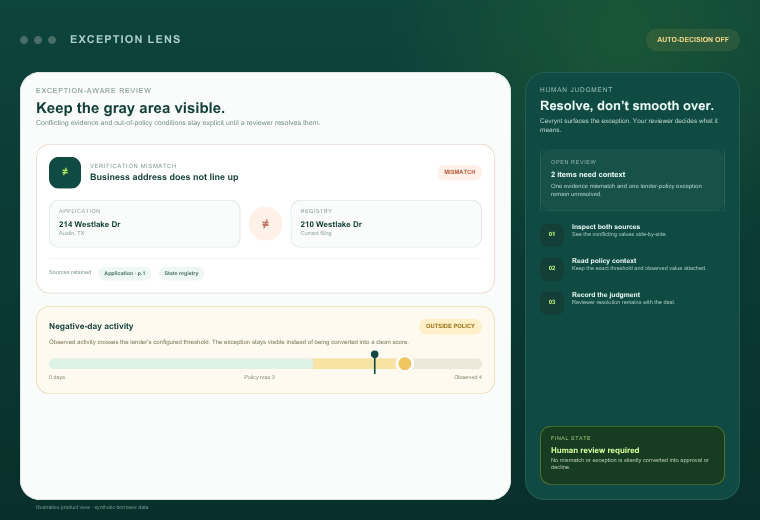
Cevrynt's Fraud Signals module applies systematic checks, including running-balance verification and cross-document consistency, to every submitted file rather than leaving them to visual review. Each flag links to its exact location in the source document through Document Intelligence, so a reviewer can open the page, see the line and judge the evidence directly.
Those flags sit alongside Bank Statement Analysis, business verification and policy evaluation in one evidence-linked review, with reviewer notes, overrides and audit history kept with the file. Cevrynt does not declare a document fraudulent and does not decline applications: it surfaces findings for people, and the lender's underwriters keep final authority over every decision.
If you want to see how this works on the kinds of statements your team receives, book a walkthrough with our team.