
What did the borrower actually send?
Classify every submitted file, extract the fields underwriting depends on, and keep each value linked to the page and line it came from — before anyone starts the analysis.
What arrives
Nothing arrives labelled. That is the first problem, not a footnote.
A submission is whatever was to hand when it was sent. Twelve of these resolve into something the rest of the platform can work with. Three do not, and what happens to those three is the part worth watching.
- 15
- Files in one illustrative submission
- 12
- Given a type and grouped
- 03
- Held and handed back
- 01Bank statements06Statement · FebruaryStatement · AprilStatement · MayStatement · JuneStatement · JulyStatement · July (duplicate export)
- 02The application02Signed applicationFunding request form
- 03Business filings02Articles of organisationState licence
- 04Identity and ownership02Owner IDOwnership schedule
- 05Not recognised03IMG_4417.HEICscan (3).pdfUntitled documentHeld exactly as they arrived, named as unrecognised, and put in front of a person. Nothing here is given a type it might not have, and nothing downstream is told these are something they are not.Handed back · no type assigned
What the sort is required to keep
- The file as it arrivedUnaltered
- Why a type was assignedRecorded
- Files with no typeNamed, not guessed
- Who decides on thoseA person
Classification is a reading, not a decision. Nothing about a document's type changes what a lender does with the deal, and no file is discarded for being unrecognisable.
Twelve and three, not fifteen. Anything that finds a type for every file it is handed will be quietly wrong about some of them — and quietly is the expensive part, because a wrong type here becomes a confident wrong number four stages later.
Source-linked extraction
Every reading keeps a finger on the line it came from.
Extraction that hands over a value and loses the page is a rewrite, not a reading. Pick a reading and you get the document it was taken from, the page, and the line itself.
- 05
- Readings shown
- 04
- Documents they come from
- 00
- Values printed on this page
Account statement
- 01Institution████████████
- 02Account holder█████████████████
- 03Account type█████████
- 04Statement periodPAGE 1 · HEADER BLOCK, LINE 4
- 05Opening balance████████
- 06Deposits and credits████████
- 07Withdrawals and debits████████
What the reading carries
- DocumentBank statement
- PagePage 1
- PositionHeader block, line 4
Which months the file actually covers, rather than which months it was said to cover.
A structured field with no route back to the page is a claim. A structured field carrying its document, its page and its position is evidence — and only one of the two is worth putting in front of somebody who has to sign for it.
When the type was never the problem
Six files, all read correctly, covering five months.
Getting the type right is not the same as getting the period right. July arrived twice and March never arrived at all — and nothing about correct classification finds a month that was not sent.
- 06
- Files typed as bank statements
- 05
- Distinct months they cover
- 01
- Month nobody supplied
The period those six files actually cover
- February
- MarchNot supplied
- April
- May
- June
- JulyTwo exports
Every one of the six was recognised for what it is. The type was never the problem — the period was, and no amount of correct classification finds a month that was not sent.
- 01A month that never arrivedNamedStated as a gap. Nothing is interpolated across it, and no average is computed as though the month were there.
- 02The same month twiceFlaggedBoth copies kept and the duplicate flagged, because two exports of one month are not always the same export.
- 03Pages in the wrong orderReorderedPut back in order by the numbering the document carries on itself, and the reordering is recorded rather than done quietly.
- 04A statement photographed rather than exportedPartialRead where it can be read. Pages that cannot be are named as unread rather than filled in from the ones that could.
- 05A file nobody can openHeldNamed as unopened and handed over as it arrived. It is not inferred from its filename.
- 06A portal screenshot instead of a statementHanded backRecognised as not being a statement, and put in front of a person alongside the three from stage one.
What it will not do about any of them
- Interpolate a missing monthNever
- Drop a duplicate quietlyNever
- Infer a file from its nameNever
- Call the submission completeA person
None of these are repaired. They are stated on the file so that whoever reads it next knows what they are working with, and so that a gap is never mistaken for a zero.
Six files, five months. The type was right and the period still had a hole in it — and a hole is only visible if something lines the months up and refuses to fill it in.
Reviewer control
A structure you cannot correct is not being offered for review.
Three things a reviewer changes, and one rule underneath all of them: a correction adds a line and removes nothing. Apply one and watch the record grow rather than swap.
- 03
- Changes a reviewer can make
- 00
- That overwrite the original
- 01
- Person named against each one
- 01Re-type a document.The processing statement read as a bank statement is told what it is, and everything downstream is told as well.
Was read asBank statement
Corrected toProcessing statement
Recorded with the reviewer and the time · original reading retained
- 02Repoint a reading.A figure taken off the wrong line is pointed at the right one, and the line it used to point at stays attached to the file.
Was read asClosing balance · page 4, summary block
Corrected toClosing balance · page 6, closing block
Recorded with the reviewer and the time · original reading retained
- 03Name a held file.One of the three nobody could name is named by a person, and it is recorded as a person's call rather than the platform's.
Was read asNot recognised · held for review
Corrected toOwner ID · named by a reviewer
Recorded with the reviewer and the time · named by a person, not by the platform
What a correction cannot do
- Delete the original readingNever
- Be applied without a personNever
- Be reversed out of the recordNever
- Change the lending decisionA person
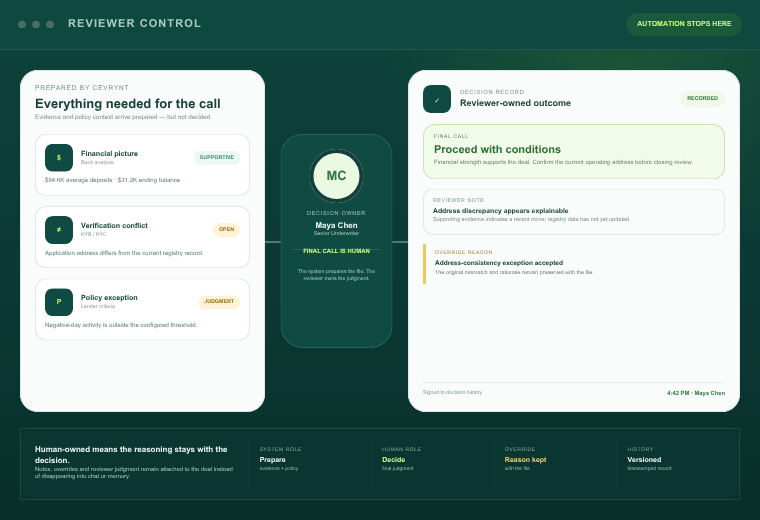
Corrections move in one direction: they add. Cevrynt does not correct reviewers, does not re-open a change a reviewer has made, and issues no approval, decline or price at this stage or any other.
This reset exists on this page and nowhere else. In the product a recorded correction cannot be taken back out of the record.
A correction that erases what it corrects is not a correction, it is a rewrite. Every change here adds a line and removes nothing — which is the only version that still answers the question six months later, when somebody asks why the file says what it says.
Downstream
This is stage two. Everything after it reads what it produced.
Structuring documents is not the product; it is the floor the product stands on. Eight stages run from intake to a human decision, and the file passes through every one of them.
- 08
- Stages from intake to a decision
- 02
- Where this page sits
- 05
- Stages reading what it produced
- 01IntakeBefore thisThe submission arrives as it was sent: whole, unsorted, and in whatever the broker had to hand.
- 02DocumentsThis pageFiles are told apart, structured, and kept attached to the line each reading came from. Everything below inherits this.
- 03FinancialsReads thisReads the statements this stage identified as statements, across the period it established.
- 04VerificationReads thisChecks the entity against the filing this stage pulled the legal name out of.
- 05FraudReads thisCompares what the application claimed with what the documents underneath it actually show.
- 06PolicyReads thisEvaluates your thresholds against structured figures instead of against a scanned page.
- 07ReportReads thisCarries every finding back to the document, page and line it came from.
- 08Human decisionA personThe underwriter decides. Cevrynt does not approve, decline or price anything.
What travels with the structure
- Document it came fromRetained
- Page and positionRetained
- Files with no typeFlagged, not filled in
- Final dispositionNone issued
Cevrynt is AI-assisted infrastructure for human underwriting. It is not a lender, it makes no funding offer, and lenders retain final approval authority.
Five of the eight are reading something this one wrote down, and the last one is a person. That is why the unrecognised pile is handed back rather than guessed at: an error here does not stay here, and it stops announcing itself as an error the moment it becomes a number.
Founder-led
Bring the submission that usually breaks things.
The interesting half of a walkthrough is the file nobody wants to open: the statement that arrived as photographs, the month that is missing, the name that does not match the filing. Describe one of those and we will run it against the real thing rather than a tidy demo.