
Bank statement analysis software turns a borrower's statements into structured transactions and underwriting metrics. It reads the text layer of a PDF, or runs OCR on a scan, parses each transaction table, normalizes dates and amounts, categorizes every row as revenue, transfer, funding proceeds or debt payment, reconciles the statement's balances, and computes figures such as true revenue and average daily balance, each linked back to its page.
This guide looks under the hood. It covers the input types a tool has to handle, how text extraction and OCR differ, why table parsing across bank formats is the hard part, how transactions are normalized and categorized, how recurring debits and existing positions are detected, how each core metric is computed, and how reconciliation, confidence scores and source links keep the output honest. It ends with a practical method for comparing tools on your own past files. If you want to know what to look for in the statements themselves, start with our bank statement analysis guide for underwriting; if you are deciding between a standalone analyzer and a full workflow, read bank statement analysis software vs. an underwriting platform.
How does bank statement analysis software work?
Bank statement analysis software works as a pipeline: get the statement in, read its text, rebuild its transaction tables, put every row into one standard shape, label what each row is, and only then compute metrics. Each stage depends on the one before it, so an error early in the chain shows up later as a wrong revenue figure or a missed position.
Stages fail differently. A reading error turns 8,000 into 3,000. A parsing error moves an amount into the balance column. A normalization error treats a debit as a credit. A categorization error counts a loan disbursement as sales. When you debug a strange number, the first question is which stage produced it.
The output of a good pipeline is not just a set of totals. It is a table of transactions, each with its date, amount, direction, description, category, the rule or model that assigned the category, a confidence level, and a pointer to the exact page and line it came from. The totals are then a view over that table, which means an underwriter can always ask where a number came from and get an answer in one click. That idea, covered in depth in source-linked extraction, is what separates analysis you can defend from a spreadsheet you have to trust.
What inputs can bank statement reader tools handle?
Bank statement reader tools typically accept four kinds of input: native PDFs downloaded from online banking, scanned PDFs, phone photos or screenshots, and transaction data pulled directly from the bank through a data connection. Each carries different information and different risks, so a serious tool treats them as separate paths rather than one generic upload.
Native (digital) PDFs
A native PDF is generated by the bank's statement system and contains a real text layer: every character is stored as text with a position on the page. These are the best case. Extraction reads characters exactly as the bank wrote them, so there is no character-recognition error. The remaining risks are layout problems (which text belongs to which column) and the fact that a native PDF can be edited after download, which is a document-integrity question covered in our guide to detecting fake bank statements and edited PDFs.
Scanned PDFs and images
A scanned statement is a picture of a page wrapped in a PDF. It has no text layer, or it has one produced by the scanner's own OCR, which may be poor. Phone photos and screenshots add skew, shadows, curved paper, compression artifacts and cropped edges. The software has to clean the image (straighten, de-skew, adjust contrast), then recognize characters. Scans are common in MCA submissions because brokers forward whatever the merchant sent, and they are where most extraction errors live.
Bank-data connections
A bank-data connection pulls transactions directly from the institution, with the account holder's authorization, through an aggregator or the bank's own interface. The data arrives already structured, so there is no OCR or table parsing, and it is much harder to fabricate than a PDF. The trade-offs are coverage (not every bank or account type connects), history depth (some connections return only a limited window), and formatting (descriptions are often truncated or rewritten by the data provider, which can change how rows categorize).
A regulatory note, because it comes up in buyer conversations. The CFPB's personal financial data rights rule under Section 1033, issued in October 2024, requires covered providers to make consumers' data available to consumers and authorized third parties. The underlying statute defines a consumer as an individual, and the CFPB has since opened a reconsideration of parts of the rule. For business lending, do not assume the rule gives you a right to a merchant's business account data. Business account connections typically rest on the account holder's authorization and the data provider's own terms, and the regulatory picture is still moving, so check current guidance with counsel rather than relying on a summary.
How does software read text from a bank statement: extraction and OCR?
Software reads a native PDF by extracting its embedded text and the coordinates of every character; it reads a scan by running optical character recognition (OCR) on the page image. Good tools try the text layer first and fall back to OCR only for pages that have no usable text, because extraction is exact and OCR is an estimate.
Text-layer extraction is less simple than it sounds. PDFs store text as positioned fragments, not as lines or words. A transaction line may be stored as six fragments in arbitrary order, and a number like 12,480.00 may be split into two fragments by the bank's rendering engine. The extractor has to rebuild words and lines from coordinates. Some statements also embed fonts with remapped character codes, so the visible glyph '5' is stored as a different code; a naive extractor then returns gibberish even though the page looks perfect. The fix is to detect unreadable text layers and route those pages to OCR.
OCR quality depends on the image more than on the engine. Resolution, skew, contrast and compression decide whether a 3 reads as an 8. Bank statements are a hard case because they are dense, use small fonts, and are full of digits where a single wrong character changes the meaning. Things a good OCR stage does for statements in particular:
- Restricts amount and date columns to the characters they can contain (digits, separators, minus signs, parentheses), which removes a whole class of letter-for-digit errors.
- Keeps a per-character or per-field confidence score, so low-confidence amounts can be flagged instead of silently accepted.
- Detects rotated and upside-down pages, which are common when merchants scan double-sided statements.
- Records which pages were OCR'd, because that is useful context for both reviewers and fraud checks.
Language models can now read page images directly, which helps with messy layouts but adds a new failure mode: a plausible number that is not on the page. The safeguard is the same either way: check every amount against the statement's arithmetic and point every value to its page region.
How do tools parse transaction tables across different bank formats?
Tools parse transaction tables by finding the table region on each page, identifying its columns, and assigning every piece of text to a row and a column. This is the hardest stage in bank statement analysis because there is no standard statement layout: each bank, and often each product or year at the same bank, prints transactions differently.
The variations that break parsers are predictable once you have seen enough files:
- Column structure. Some banks print one amount column with signed values; others print separate debit and credit columns; others group transactions into sections (deposits, withdrawals, checks, fees) with one amount column per section.
- Running balance. Some statements print a balance after every transaction, some print a daily ending balance in a separate summary table, and some print no daily balances at all.
- Multi-line descriptions. An ACH description can wrap onto two or three lines, and the continuation lines carry the identifying detail (company name, ID, reference). A parser that treats each line as a new transaction creates phantom rows with no amount.
- Check images and check tables. Checks may appear as a compact table of check number, date and amount, sometimes in three side-by-side columns that must be read across rather than down.
- Repeated headers and footers. Page headers, account numbers, page counts and marketing messages appear on every page and must not become transactions.
- Date formats without years. Most statements print 03/07, so the year has to come from the statement period, which matters for statements that span December and January.
There are two broad parsing approaches. Template-based parsing uses a stored layout for each known bank format; it is very reliable for formats it knows and fails, sometimes silently, when a bank changes its layout. Layout-learning parsing infers columns from the geometry of the page and the type of content (dates on the left, amounts right-aligned, descriptions in between); it generalizes to unfamiliar banks but makes more small mistakes. Most mature tools combine both and use the statement's own arithmetic as the referee.
Multi-page and multi-account statements
A single PDF can contain several accounts: an operating checking account, a payroll account and a savings account, each with its own summary and transaction table. The parser has to split them by account number and keep each account's transactions, balances and period separate. Mixing them is a common cause of inflated revenue, because a transfer from savings into operating then looks like a deposit with no matching withdrawal.
Tables also continue across pages, often with a 'continued' header and sometimes with the column headers dropped. The parser must stitch the table back together and confirm no rows were lost at the page break. A missing page is one of the most common real-world problems, and it is invisible unless something checks for it. Two cheap checks catch most cases: page numbering ('Page 3 of 6') and statement arithmetic.
What is transaction normalization?
Transaction normalization converts every parsed row, from any bank and any input type, into one consistent record: a full date, a signed amount, a direction, a cleaned description, the account it belongs to, and its source location. Everything downstream, from categorization to metrics, depends on this shared shape.
The details matter. Amounts in parentheses or with a trailing minus are negative. Debits printed as positive numbers in a 'Withdrawals' column must become negative. Thousands separators and the occasional comma-decimal format must be handled. Years must be inferred from the statement period. Descriptions are cleaned for matching (collapsed whitespace, consistent case, standard abbreviations) while the original text is kept for display, because the underwriter should always see what the bank printed. An illustrative normalized record looks like this:
{
  "account": "operating-4417",
  "statementPeriod": "2026-03-01/2026-03-31",
  "date": "2026-03-07",
  "amount": 9875.00,
  "direction": "credit",
  "descriptionRaw": "CARD DEP 4417 MERCH SVCS BATCH 0307",
  "descriptionClean": "card deposit merch svcs batch",
  "category": "revenue.card_settlement",
  "categoryRule": "card-processor-batch",
  "confidence": "high",
  "runningBalance": 27290.00,
  "source": { "file": "march-2026.pdf", "page": 2, "line": 14 },
  "inputType": "native_pdf"
}
The `categoryRule` field records why a row was labelled as it was, so a reviewer can correct a whole class of rows at once. The `source` field is the evidence link; without it, every downstream number is an assertion.
Normalization is also where duplicates are handled. When the same period arrives twice (a PDF and a bank-data connection, or two overlapping PDFs), the same transactions appear twice. The tool should match them on date, amount and description, keep one, and record that the period was covered by two sources. If the two sources disagree on a transaction, that is not a deduplication problem; it is a finding for the fraud review.
How does software categorize deposits, transfers, loan proceeds and MCA debits?
Software categorizes transactions by combining description patterns, counterparty matching, amount and timing behavior, and the account context, then assigning each row one category with a recorded reason. The categories that matter most for underwriting are the ones that change revenue and obligations: true revenue deposits, transfers between the merchant's own accounts, funding proceeds, reversals, and debits to other funders.
The signals used to categorize a row, roughly from strongest to weakest:
- Account context. A credit whose counterparty is another account the merchant submitted (matching account number fragments, or an equal and opposite debit on the same or next day in the other account) is an internal transfer, not revenue.
- Counterparty and description patterns. Card processor batch descriptions, marketplace payout descriptions, payroll processors, tax payments and known funder descriptors all have recognisable patterns. ACH entries carry the originating company's name, which is why ACH debits from funders are often identifiable even when the descriptor is abbreviated.
- Amount and timing behavior. A large round-number credit followed within days by fixed daily or weekly debits from a new counterparty looks like funding proceeds and a new position. Card settlements arrive almost every business day in varying amounts.
- Reversal pairing. A credit that is followed by an equal debit described as a return, reversal or chargeback, or a deposited item returned, should be netted out, not counted twice.
- Lender rules. Your own policy may treat some sources differently, for example counting marketplace payouts as revenue but excluding owner contributions and refunds of loan payments. These rules belong in configuration, not in someone's head.
Categorization errors are rarely random. They cluster around a few patterns: a new funder whose descriptor the tool has not seen, a payment processor that uses a generic description, peer-to-peer transfers that could be either customer payments or owner money, and cash deposits, which carry no counterparty at all. That is why a tool should let a reviewer recategorize by rule ('all credits from this descriptor are owner transfers') and should show what changed in the metrics as a result.
How does software detect recurring debits and existing positions?
Software detects existing positions by grouping debits by counterparty, then testing each group for a regular cadence (daily on business days, weekly, or monthly), a fixed or near-fixed amount, and a start date that often follows a matching funding credit. A group that passes is reported as a likely position with its estimated payment, frequency and monthly burden, for a person to confirm.
Mechanically, the steps look like this:
- Group debits by normalized counterparty. This is harder than it sounds because one funder may use several descriptors, and a servicer may collect for several funders under one name.
- Measure cadence. Compute the gaps between debits in business days. A daily ACH shows gaps of one business day with weekend and holiday jumps; a weekly one shows gaps of five business days.
- Measure amount stability. Many positions debit a fixed amount; others debit a percentage of receipts, so the amount varies with sales. A fixed-amount test alone misses split-funding style collections.
- Look for the start. A funding credit from the same or a related counterparty shortly before the first debit is strong evidence. The absence of a funding credit within the statement window just means the position started earlier.
- Look for the end or a change. Debits that stop, change amount, or bounce (a returned debit) tell you whether a position was paid off, renewed, renegotiated, or is in trouble.
Each detected position should be shown with its rows, so the underwriter can see the evidence rather than a label. Recurring debits that are not financing (a lease, an insurance premium, a software subscription) can look like positions, and that is a judgment the reviewer makes with the evidence in front of them. The broader risk pattern, and what to do when you suspect it, is covered in detecting stacking in MCA underwriting.
What bank statement metrics matter for underwriting, and how is each computed?
The bank statement metrics that matter most for MCA and SMB underwriting are true monthly revenue, average daily balance, negative-balance days and NSF counts, deposit frequency and concentration, revenue trend, and existing payment burden relative to revenue. Each is a simple formula over the categorized transactions; the quality of the metric is set by the categorization underneath it.
Below are the definitions a tool should be able to show you, with an illustrative calculation for Cedar & Stone LLC over a three-month window. These numbers are invented for explanation only. How to interpret them, and how they interact, is covered in average daily balance, DSCR and deposit consistency and cash flow underwriting for SMB loans.
True revenue
True revenue = total credits − own-account transfers in − funding proceeds − reversals and refunds − other excluded credits. Illustrative: total credits over three months of 412,600.00, less 18,000.00 in transfers from savings, 40,000.00 in funding proceeds and 2,400.00 in reversals, gives true revenue of 352,200.00, or an average of 117,400.00 a month. The gap between 412,600 and 352,200 is exactly why gross deposits should never be used as revenue.
Average daily balance
Average daily balance = sum of end-of-day balances for every calendar day in the period ÷ number of days in the period. Days without transactions carry the previous day's balance forward. Illustrative: end-of-day balances in March summing to 1,054,000.00 over 31 days give an average daily balance of 34,000.00. If the statement prints no daily balances, the tool has to rebuild them from the opening balance and the transactions, which is only reliable if the statement reconciles. Check whether a tool uses calendar days or business days, and whether it matches your policy.
Negative days and NSF events
Negative days = count of days whose end-of-day balance was below zero. NSF count = count of returned or rejected items and NSF fee entries, deduplicated so one bounced item that generates a fee and a return is counted once. Illustrative: 2 negative days and 1 NSF event in the window. The pattern behind these counts matters more than the count, which our article on NSF patterns and overdrafts explains.
Deposit frequency and concentration
Deposit days = number of days with at least one revenue deposit. Deposit count = number of revenue deposits. Concentration = largest single revenue source ÷ true revenue. Illustrative: 61 deposit days and 74 revenue deposits over the window, with the card processor at 81% of true revenue. High concentration is not good or bad on its own; for a restaurant it is expected, for a contractor paid by one general contractor it is a dependency worth noting.
Revenue trend
Month-over-month change = (this month's true revenue − last month's) ÷ last month's. Illustrative: 112,900.00, 116,300.00 and 123,000.00, a rise of about 3% and then about 6%. Three months is a short series; seasonality can make a normal year look like a decline. A tool should show the monthly figures, not just a slope.
Existing payment burden
Monthly position burden = sum over detected positions of (payment amount × payments per month). Burden ratio = monthly position burden ÷ average monthly true revenue. Illustrative: a daily debit of 389.00 over about 21 business days (8,169.00) plus a weekly debit of 1,250.00 at about 4.33 weeks per month (5,412.50) gives 13,581.50 a month, or about 11.6% of 117,400.00 average revenue. Whether that leaves room for another obligation is a policy question for your credit policy and your underwriter, not something the analyzer should decide.
How do reconciliation checks catch extraction errors?
Reconciliation checks recompute the statement's own arithmetic from the extracted transactions: beginning balance plus credits minus debits must equal the stated ending balance, and each running balance must equal the previous one plus the row's amount. If the numbers do not tie out, something was misread, dropped or duplicated, and the statement should not feed metrics until a person has looked.
Reconciliation is the single most useful quality control in bank statement analysis because it uses the bank's own numbers as the answer key. It catches misread digits, rows dropped at page breaks, rows read twice, debits treated as credits and missing pages. It works at three levels, from coarse to fine:
- Statement level. Beginning balance + total credits − total debits = ending balance. Many statements also print total deposits and total withdrawals in the summary, which gives two more equations to check.
- Running-balance level. Each printed running balance = previous balance + this row's signed amount. This localizes an error to a specific row, which is what a reviewer needs.
- Continuity level. Each statement's beginning balance = the previous statement's ending balance, and statement periods are contiguous with no gaps. A gap between periods means a month is missing; a mismatch means one of the statements is wrong or from a different account.
In the illustrative failure above, the 3,200.00 gap points straight at the debits side. Running-balance checks would then show where the printed balances stop agreeing with the recomputed ones, usually at a page boundary. A statement that reconciles is not proof the document is genuine; an edited statement can be made to add up. That is why reconciliation is a data-quality check, while document integrity is a separate check covered in our document fraud guide. They answer different questions and both belong in the file.
How should software handle confidence, exceptions and source links?
Software should attach a confidence level and the checks it passed to every extracted value, accept only values that are both high-confidence and reconciled, send everything else to a reviewer with the source region highlighted, and keep a link from every number to its page and line. Exceptions should be visible and specific, never resolved silently.
Confidence is only useful if it is calibrated and specific. 'This statement is 94% confident' tells a reviewer nothing. 'The amount on page 3, line 22 was read by OCR at low confidence, and the running balance does not tie out after that row' tells them exactly where to look. Useful exception types to expect from a tool:
- Statement does not reconcile, with the first row where running balances diverge.
- Missing page (page numbering gap) or missing period (gap between statements).
- Account mismatch: the account number, holder name or bank differs from the rest of the file.
- Unrecognized large credit that could be revenue, transfer or funding proceeds.
- New recurring debit pattern from an unknown counterparty.
- Same period supplied twice with different transactions.
- Low-confidence OCR on an amount or date field.
Source links are what make review fast. When a reviewer clicks a revenue figure, they should see the rows behind it; when they click a row, they should see the highlighted line on the original page. That path is also what an auditor, a credit committee or a syndicate partner will want later, which is why the same links should carry through into the underwriting report. Overrides belong in the same record: if a reviewer recategorizes a credit, the file should show the original category, the new one, who changed it and the note they left.
How do bank statement analysis platforms compare to each other for underwriters?
The only reliable way to compare bank statement analysis platforms is to run them on your own past files and measure field-level errors, categorization disagreements, exceptions raised and reviewer time per file. Vendor demos use clean statements; your files include the scans, odd banks and multi-account PDFs that decide whether a tool helps or creates rework.
A practical evaluation method that a small underwriting team can run in two or three weeks:
- Build a test set. Pick 30 to 50 past files that represent your real mix: your most common banks, at least a handful of scans and phone photos, multi-account PDFs, files with known positions, and a few files where your team found problems. Remove or mask personal data as your policies require before sharing them with anyone.
- Create the answer key. For each file, record the values your team signed off on: statement periods, beginning and ending balances, true monthly revenue, the list of positions with payment amounts, NSF count and negative days. Where your own past work was rushed, correct it first.
- Measure extraction. For a sample of statements, compare every transaction: rows found versus rows on the page, rows invented, amounts wrong, dates wrong, direction wrong. Field error rate = wrong fields ÷ fields checked. Count reconciliation pass rates per statement.
- Measure categorization. For each file, compare the tool's revenue exclusions and detected positions with your answer key. Record every disagreement and who was right, because sometimes the tool will find something your team missed.
- Measure exceptions. Count how many issues the tool flagged, how many were real, and, more importantly, how many real issues it did not flag. A silent miss is worse than a false alarm.
- Measure time. Time a reviewer working each file with the tool, from upload to a signed-off spreadsheet or report, and compare with your current time per file. Include the time spent fixing the tool's errors, not just the time it saved.
Keep the scorecard per input type and per bank. A tool can excel on native PDFs from large banks and struggle with regional scans; an average hides exactly the cases that cost you time.
Beyond the numbers, ask whether you can set your own revenue exclusion rules, correct a pattern once and see metrics update, and export transactions and decisions. The voluntary NIST AI Risk Management Framework is a reasonable reference for documenting how you tested a tool and who is accountable for its output.
From here, this article is about Cevrynt
How Cevrynt approaches bank statement analysis
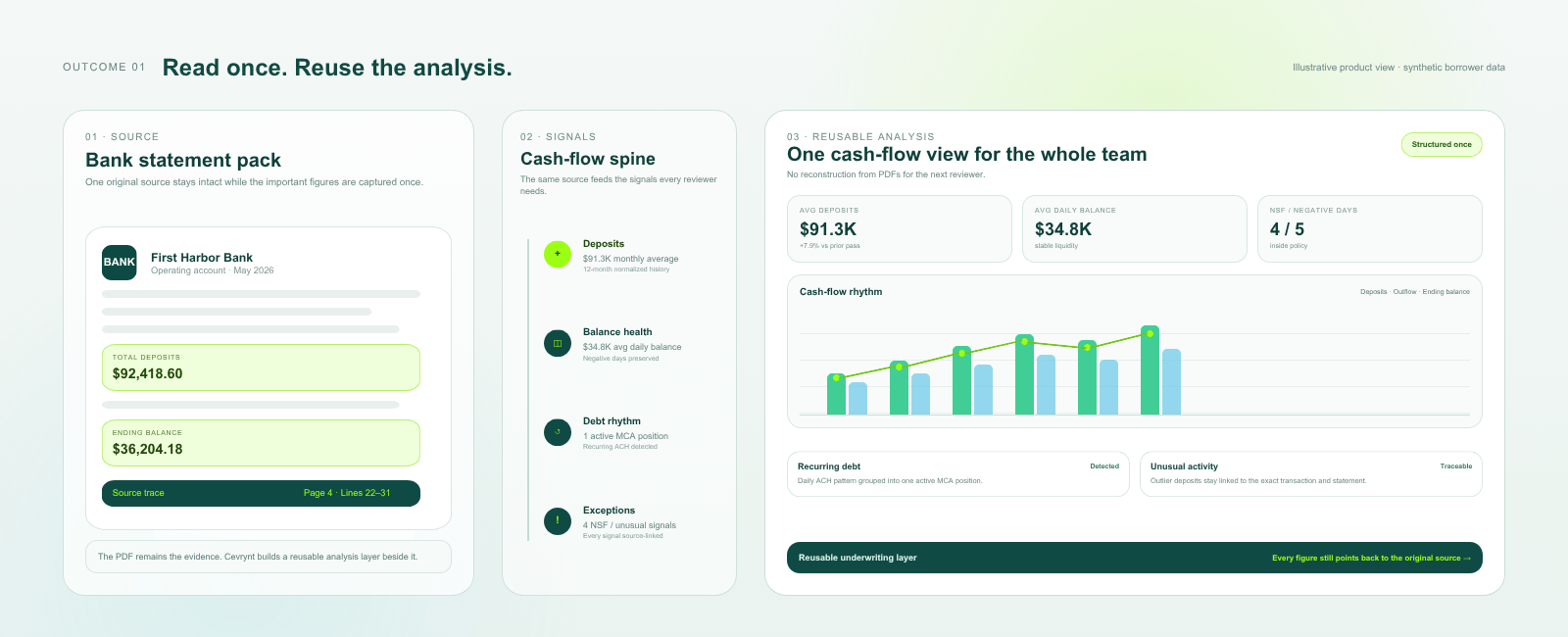
Cevrynt's Bank Statement Analysis module structures statements into source-linked transactions and computes cash-flow, deposit, balance and transaction analysis for human underwriters. Values link back to the page they came from, statements are checked against their own balances, and uncertain rows and unreconciled statements are surfaced for review rather than resolved silently. Reviewer notes and overrides are kept with the file. Statement extraction sits on the same document intelligence layer that structures the rest of the borrower file.
The analysis then feeds the rest of the review: fraud signals and your own policy rules are evaluated against the same evidence, and the underwriting report carries the links through. Outputs are flags and analysis for a person. Cevrynt is not a lender and does not fund deals; any offer is built from your own pricing and terms and sent only when you decide, and your underwriters keep final authority on every file.
If you fund merchant cash advances, the MCA solution page shows how this fits an MCA workflow. The best way to judge any tool, including ours, is on your own files: book a walkthrough or ask about a scoped pilot.